
Everything real-time operations needs, in one hosted box.
Monitoring, correlation, service impact, ticketing, notifications, knowledge and reporting in one platform, plus the AI agents and setup hours to put it to work. Your team still makes the calls. Rapax does the watching, sorting and paperwork, so fewer people with less specialist training can run a NOC.
Ten jobs, one platform, one thing to administer.
The case for one platform isn’t fewer logos. It is one system to keep running, and correlation across logs, polling, alerts and services in one place, which separate tools can’t do. Rapax integrates with the systems it doesn’t replace.
| Capability | What Rapax 2.0 does | Without it, typically |
|---|---|---|
| Log collection | Syslog and SNMP trap receiver, search, live tail, export | A separate log tool |
| Ping and SNMP polling | SNMP v2c and v3, latency and loss, a discovery wizard for new devices | A separate monitoring tool |
| Availability and SLA | Availability per device and service, SLA targets, error budgets, scheduled reports | A reporting tool or spreadsheets |
| Correlation and root cause | Parent/child, topology and service correlation, with root cause one click away | An event-management tool |
| Service impact | Maps every alert to the business services it affects | Often not done at all |
| Performance analytics | Baselines, anomaly detection and capacity forecasts | A separate analytics tool |
| Ticketing | Native incident management, a customer portal, an AI tier-1 agent, plus Zendesk, osTicket and Salesforce connectors | An ITSM tool |
| Configuration management | Device configuration collection and history with what changed, alongside inventory and discovery with duplicate review | A separate config tool or CMDB |
| Knowledge | AI answers grounded in your own runbooks, with sources | A wiki nobody reads |
| Multi-tenancy | Scoped views per customer or business unit | Separate instances |
Hosted, staffed by software, and yours to run.
Hosted for you
Each customer gets a dedicated server sized to its device tier, in the region it chooses. Prefer your own server? The same one-script installer runs there.
AI agents included
Assistants that brief, answer, triage tickets and notify, using the AI provider you choose: Ollama on your own network, or your own key for OpenAI, Anthropic, Gemini or Grok.
Guided setup
A Get Started guide checks your certificate, email and AI provider, then walks you through devices, services and notifications. The built-in assistant answers setup questions.
Self-maintaining
One-click updates with a snapshot first and rollback if anything fails. Backups, certificates and components managed from the browser.
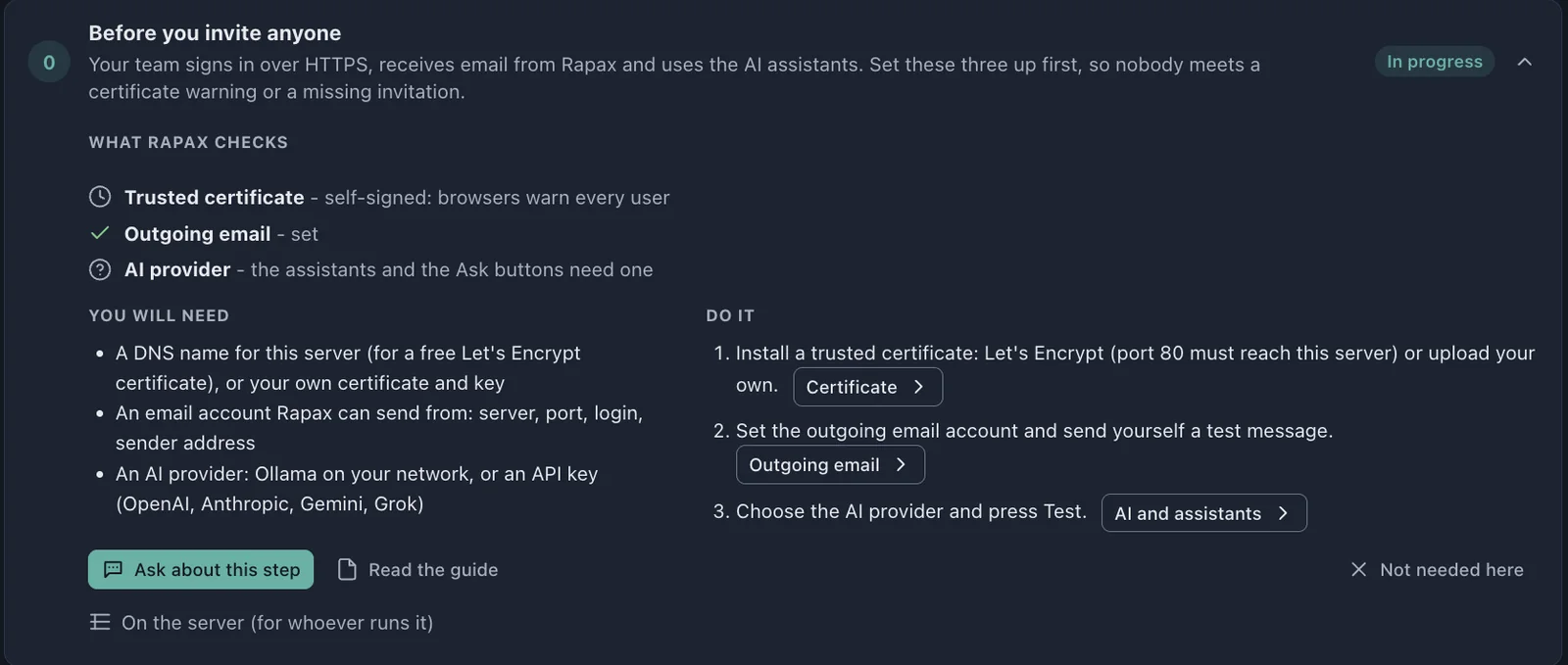
One root cause, one pattern, one date.
One example looks back to a root cause, one catches a pattern no threshold would, and one looks ahead to a date. None needed an expert to set up.
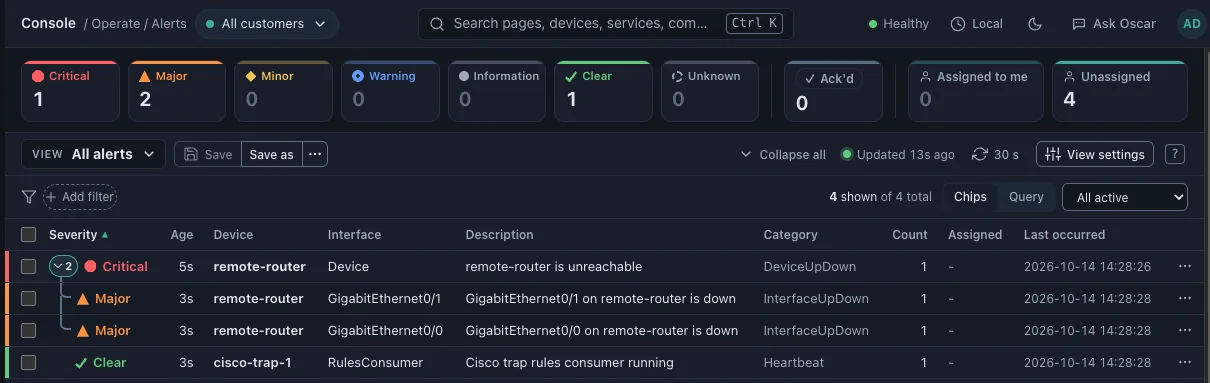
A switch uplink fails at a branch office.
Collect
The site’s remote collector reports it to Rapax over TLS.
Correlate
Downstream alerts nest under one parent: one critical problem, not three alerts.
Show impact
The alert drawer names the business service that is down.
Answer
The knowledge assistant answers “what do we do?” from your own runbook, citing it.
Update
The AI tier-1 agent updates the ticket and the customer portal.
Close
An administrator confirms the fix and closes the loop.
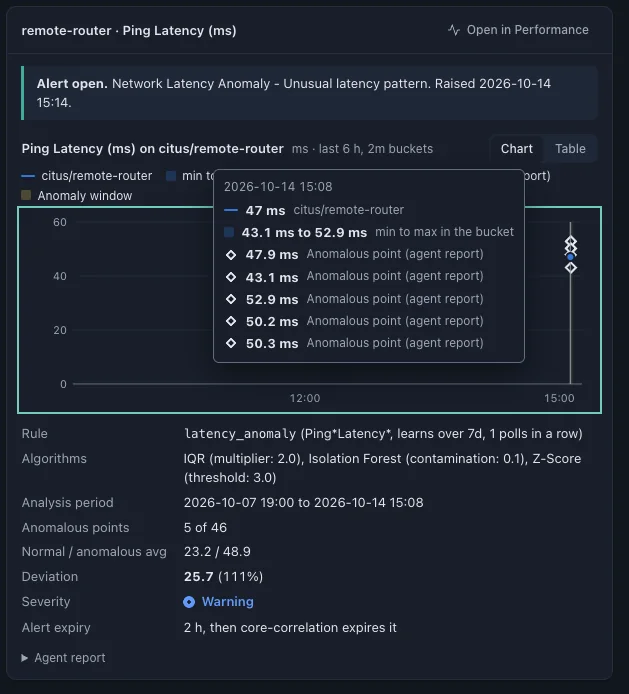
Some problems never cross a threshold.
The anomaly agent learns a week of normal behavior for each metric and flags what breaks the pattern. When a router’s ping latency moved from a normal average of 23 ms to 49 ms, Rapax raised a warning before any fixed threshold would have fired.
It showed its work on the alert: the methods it used, 5 anomalous points out of 46, and a 111% deviation.
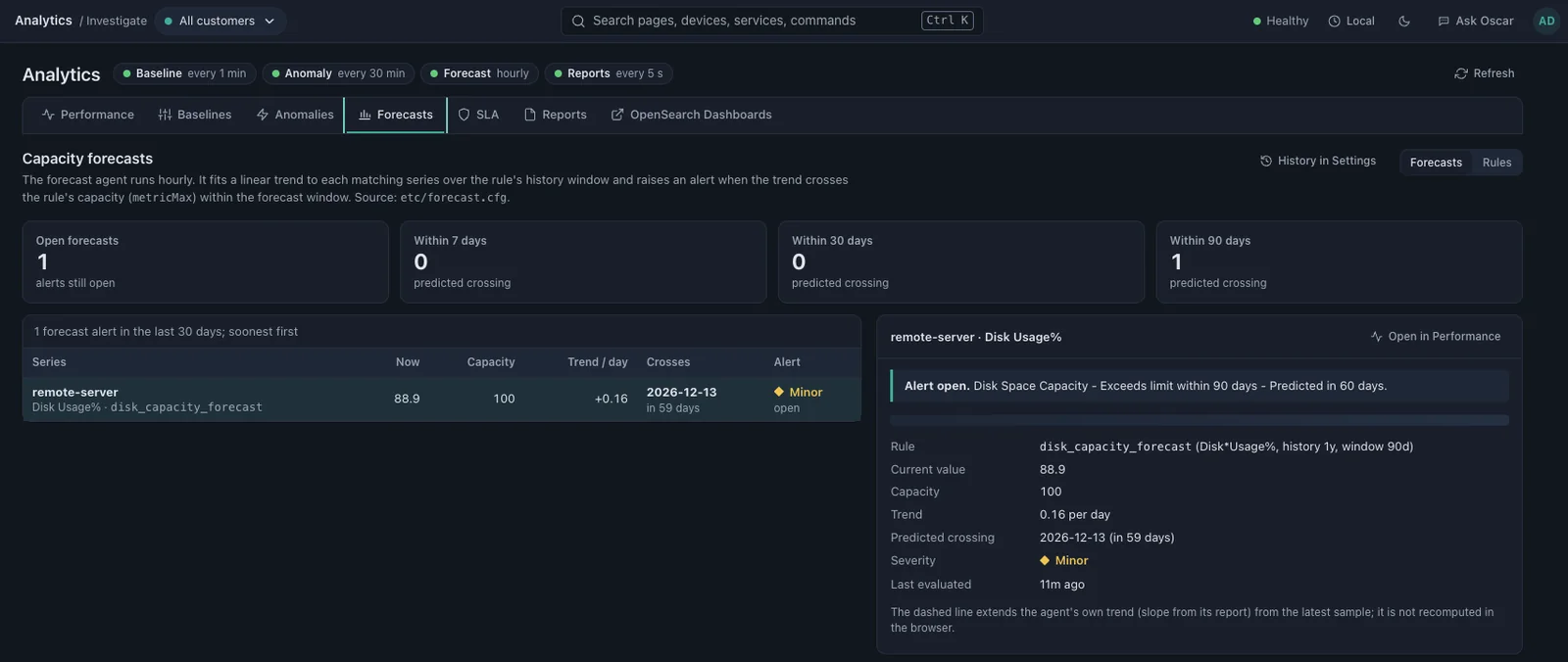
Capacity problems arrive as a date.
The forecast agent fits a trend to each metric every hour. When a server’s disk sits at 88.9% and grows 0.16 points a day, Rapax doesn’t wait for 100%. It raises an alert that says the disk crosses capacity on a specific date, 59 days out.
The six-point test.
Score your current monitoring against six tests. A platform that fails three or more is pushing its operating cost onto your team. Ten years ago, passing all six took a carrier’s budget.
| Test | What passing looks like |
|---|---|
| 1. Cloud-native | Deploys from one script on any cloud VM or server, and upgrades in place |
| 2. Self-maintaining | One-click updates and patches that can be automated, with a snapshot before every change and rollback if it fails |
| 3. Point-and-click administration | Users, backups, certificates, components, collectors and reports managed from the browser |
| 4. AI-driven self-help | Answers grounded in your own runbooks and documents, with sources; no action without a person confirming |
| 5. Predictive, not just reactive | Baselines, anomalies and capacity forecasts that say what will break, and when |
| 6. Predictable at scale | Known capacity per server size, and collectors at every site without new infrastructure |
What one 24×7 seat really costs.
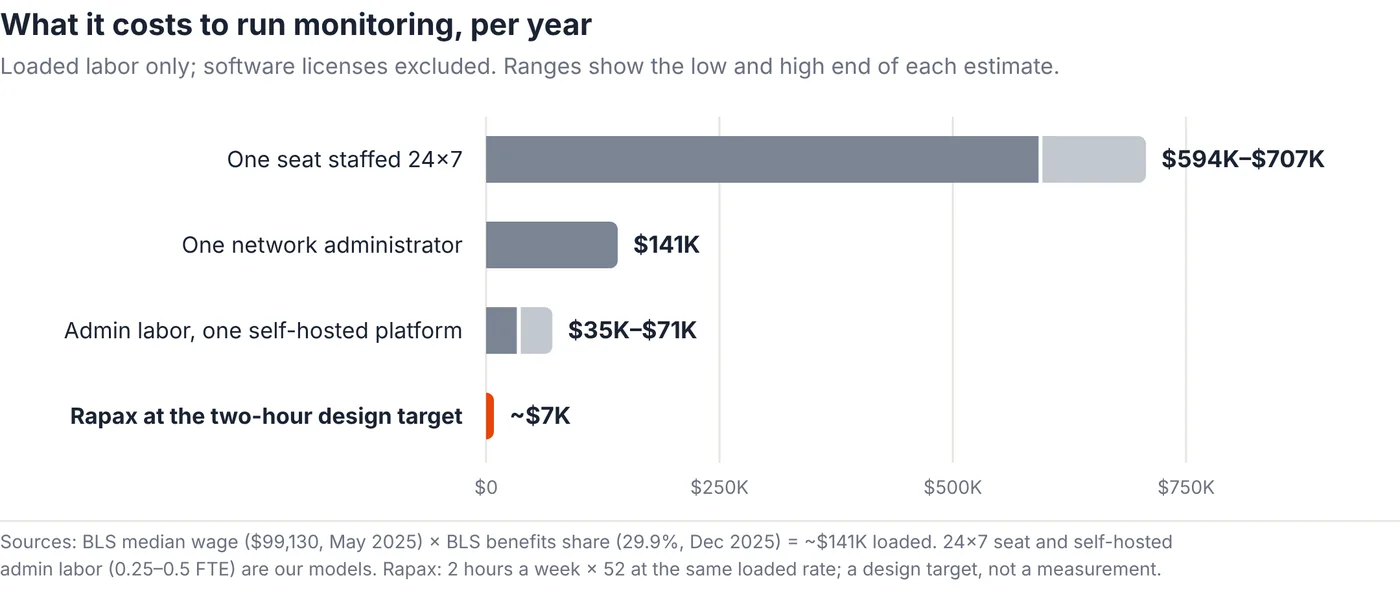
The labor to run monitoring costs more than the software. Here is our arithmetic, with every assumption shown, so you can swap in your own numbers.
One chair, staffed around the clock. Modeled
| Assumption | Value |
|---|---|
| Median wage, network and systems administrators | $99,130 [1] |
| Benefits share of compensation | 29.9%, so loaded cost ≈ wage × 1.43 [2] |
| Loaded cost per person | ~$141,000 a year |
| People per 24×7 seat | 4.2–5.0 (168 hours ÷ 40 = 4.2; up to 5.0 with about 20% for leave and training) |
| Cost of one 24×7 seat | ~$594,000–$707,000 a year |
| Administering one self-hosted platform | 0.25–0.5 of a person, ~$35,000–$71,000 a year (our field estimate) |
| Rapax at the two-hour design target | ~$7,000 a year of admin labor (2 hours × 52 weeks) |
That is one chair with nobody senior behind it. It is why most mid-market organizations don’t have a NOC at all.
We expect most teams to redeploy the time returned to projects and incident follow-up rather than cut headcount. For a growing team, it shows up as a hire not made.
Alerts first. Then decide.
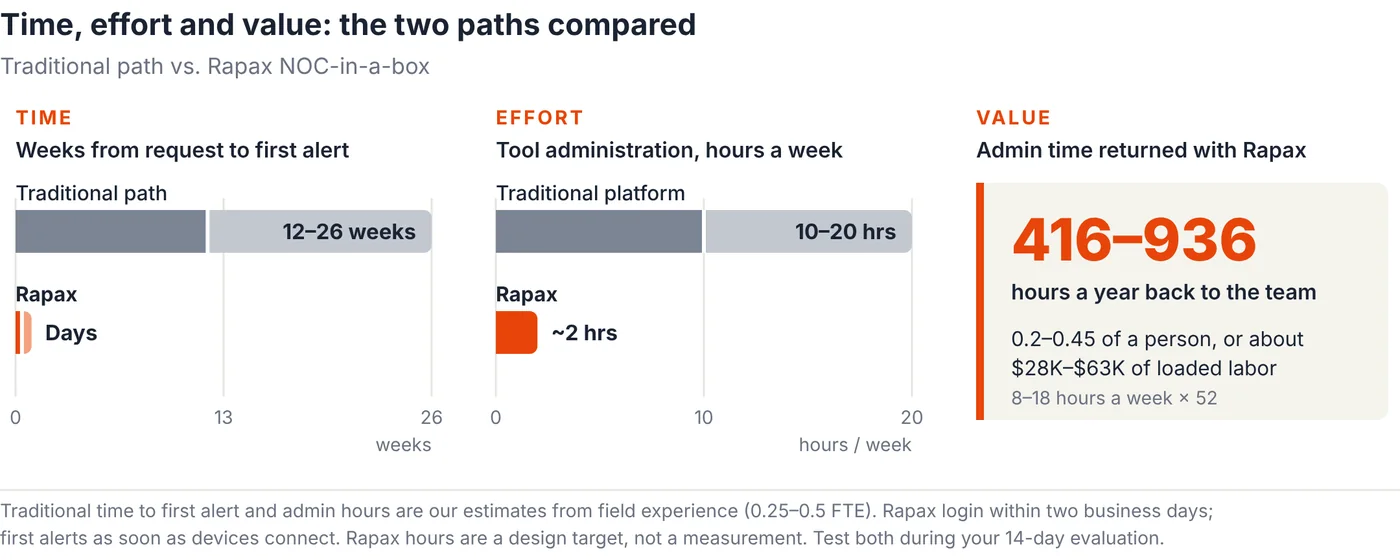
A project before a single alert
Months of approvals, hiring and installation.
- Get IT approval for new servers or a VPS
- Evaluate and hire a systems integrator
- Hire a project manager to run it
- Run a lengthy requirements and design phase
- Write, issue and score an RFP
- Take the funding request to the board
- Hire and train a team of administrators
Alerts first, then decide
Free for 14 days, hosted for you.
- Fill in a short request form
- Sign in to your own system within two business days
- Follow the Get Started guide
- Connect your network from the browser
- See correlated alerts on your own devices
- Run it in a couple of hours a week (design target)
Common questions.
“Cheaper means less capable.”
The operating burden came down, not the feature set: correlation, service impact, analytics, ticketing and the agents are all in the box, packaged so a small team can run them. The evaluation exists so you can check that on your own network.
“Hosted means our data leaves our network.”
Collectors connect out over TLS, each limited to its own data, and nothing opens inbound to your sites. Every customer runs on dedicated hosting in the region it chooses. If you would rather run it yourself, the same installer works on your own server.
“AI will make things up, leak our data or run up a bill.”
You choose the AI provider, including Ollama on your own network. Answers come from your own documents and say when those documents don’t cover the question. Token use and cost are tracked per assistant and model, and nothing changes without a person confirming it.
“We already run an ITSM tool.”
For network operations you may not need it: Rapax includes native incident management, a customer portal and an AI tier-1 agent. Zendesk, osTicket and Salesforce connectors ship today for teams that keep one.
“What about availability and scale?”
Each hosted system runs on its own server, sized to your device tier, with daily snapshots and full backups you can verify and restore from the browser. Remote collectors keep buffering for up to 24 hours if the link drops, and replay in order when it returns.
“Will you be here in three years?”
You can back up your data and your Rapax configuration from the browser and download both at any time, so you are never locked in.
- BLS Occupational Outlook, network and computer systems administrators (median wage $99,130)
- BLS Employer Costs for Employee Compensation, December 2025 (benefits 29.9% of compensation)
- ITIC 2024 Hourly Cost of Downtime Survey (self-reported)
- Splunk State of Observability 2025: ignored or suppressed alerts.
- Uptime Institute Annual Outage Analysis 2026
- Read the full argument in the position paper, NOC-in-a-Box: How Rapax 2.0 Takes the Operating Cost Out of Service Assurance (PDF).
See it on your own network.
Request your free 14-day evaluation and get a login to your own Rapax system within two business days. We’ll talk pricing once you know it works.
Request your free evaluationPrefer to talk first? Book 15 minutes or email sales@rapax.us.